
Octo Telematics's Architecture Team felt the urge to define a structured approach to design platforms and infrastructure effectively. We wanted to fill the gap between the business requirements, the software layer, and the physical layer. That led us to design and implement an Enterprise Architecture Tool tailored to our specific needs that we named Eugene.
Purpose of IT Enterprise Architecture
In the IT Field, Enterprise Architecture is an effort to align IT resources with the organization’s goals. At its core, an Enterprise Architecture Tool is a software designed to support the organization in planning, designing, implementing, and governing the entire IT stack. It ensures that all “development” efforts deliver the intended value, and that all “operations” run with efficiency and reliability.
More specifically, in the context of Octo Telematics, our key driving factors were:
- Improve the documentation and the overall map of the interactions of the IT components;
- Simplify the design phase, maximizing software reusability, to help the Development team in keeping a strong focus on new features and offer a quicker response to changes in business or technical requirements;
- Help the Operations team to define appropriate monitoring for the Software Platform, furthermore making sure they have a clear picture of the impact of any planned or unplanned activity on the Infrastructure layer;
- Reduce Operational Expenses, by ensuring that the Infrastructure meets the business and technical requirements, without any wasted resources;
- Enforce standardization among different teams, to design a seamless, clear and predictable behavior for any service within our organization.
- Improve Risk Management: with a clearer map it’s easier to spot weak or critical points and implement any required mitigation.
- Improve the Asset Management to provide a solid basis for the management of both the physical and the logical components within Octo’s IT stack.
A wider look
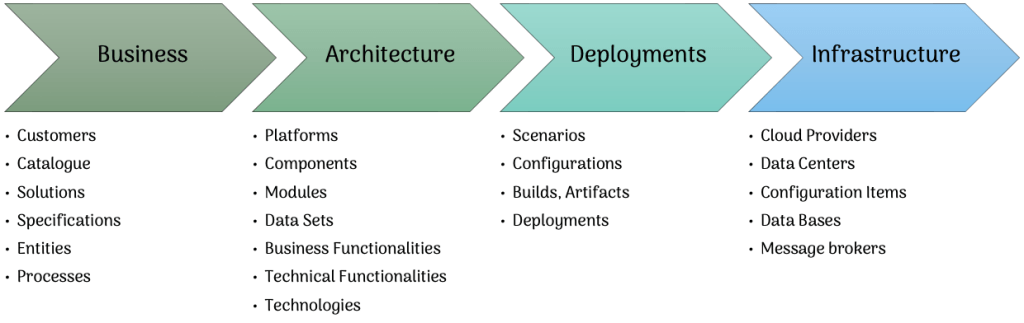
When we started designing Eugene I felt that, to get a wider look, we should have multiple pillars that would represent the main layers of the company.

- The “Business” pillar includes anything that can be represented in the real world: Customers, Commercial catalog, Solutions, Specifications, real world Entities, and Processes;
- The “Architecture” pillar includes the “abstract” Information Technology landscape: Platforms, Components, Modules (read: micro services), Data Sets, Technical and Business Functionalities, Technologies;
- The “Deployment” pillar includes the specifications to deliver what has been defined at the Architecture level, thus: Geographical Scenarios, Configuration Management, Builds & Artifacts Management, Deployment Requests and Deployment Execution;
- The “Infrastructure” pillar includes the “physical” Information Technology landscape: Cloud Providers, Data Centers, Clusters, Configuration Items (in an semi-ITIL flavor: Physical Servers, Virtual Servers, Storage, Networks, Containers and so on…), Data Bases and Message Brokers.
Interactions, relations, dependencies
Given this hierarchy, Eugene main purpose is to collect all possible information about these item, and more importantly to logically correlate them. For example, we started correlating:
- Which Solution is included in any of the Catalog Items
- Which Specification belongs to any Solution
- Which Technical Functionality implements any given Specification
- Which Module implements a certain Technical Functionality
- Which Module depends on another Module and how (loose coupling or tight coupling)
- Which Component includes that Module
- Which Platform includes that Component
- When a Module has been Deployed, with which Configuration, and on which Configuration Item
- Which Technologies a Module depends on
- Which Data Sets a Module uses
- Which Data Base contains a specific Data Set used by a specific Module
- …and so on…
The whole Eugene information base is (conceptually – not technically) a graph of correlated nodes, allowing Octo Telematics to know (and to draw) in any specific moment, for example, which Customers are affected by an infrastructure outage, or how much a specific Solution is costing on a specific Cloud Provider.
Let’s dig in an example. One of the most interesting nodes in Eugene’s Knowledge Base is certainly the Module item. The Module is the representation of the smallest piece of software that we have in Octo Telematics – in general it can be directly related to the GIT Repository containing the sources. But the Module holds a lot more information than the reference to the GIT Repository, in fact it includes:
- the type of Module (is it a Library, or an Executable, or a service or…);
- a description of the purpose of the Module;
- a view on the SharePoint folder containing all it’s documentation;
- a list of referents – analyst/architects, software developers, testers, … – that work on the Module;
- a list of Technical Functionalities the Module is providing;
- a list of Data Sets the Module is using;
- the Components this Module belongs to;
- the Technologies it’s using;
- the Relations to other Modules divided in Active Relations (when the Module is calling some other Module) or Passive Relations (when the Module is exposing an interface to be invoked by another Module) with specifications to the Interface Agreement (protocol, port, whatever…) – these are the running time dependencies;
- the hard Dependencies for this Module (for example a Library) – there are the build time dependencies;
- a list of all the available Builds of this Module divided by Version and Architecture (Native, Docker, AMD64, ARM, any possible combination);
- a list of all the active Deployments of this Modules divided by Scenario, Environment Type (Development, Test, Production…);
- the quality reports (SonarQube, Semgrep, OWASP Dependency Check, …) produced at compile time, organized by Build (and thus Version).
Here’s a sample relations graph generated by Eugene for Eugene as a Module. We’re using Graphviz to render the maps:

Recently, to help interacting with Eugene Knowledge we also integrated Cheshire Cat and built an internal tool that allows user to ask in natural language any question regarding the modules, the relations, the technical specifications, the infrastructure… anything!

An up-to-date view
The biggest, most challenging, obstacle of any documentation, whether it’s user documentation, architectural documentation, or technical documentation, it’s keeping up-to-date. To overcome this issue we spent a lot of effort in designing Eugene as an active tool in Octo Telematics everyday activities, mainly in two ways:
- Eugene is also the engine of our Software LifeCycle Management: given it’s connected both to Software Repositories and to Infrastructure, Eugene is driving all our DevOps, Continuous Integration, Continuous Deployment processes. This role gives Eugene a real time feedback on any activity that is going on on the development side (through BitBucket’s callbacks), allows Eugene to keep the software quality metrics updated running our Jenkins Pipelines, and allows Eugene to have a constantly updated Deployment Map, since all the Deployment requests are actually composed in Eugene and executed by the Eugene-driven Jenkins Deployments Pipelines.
- Eugene features a full integration with our Cloud Providers APIs and our On Premise Data Centers, giving it an immediate feedback on any Infrastructure Change (Auto Scaling, new Virtual Machines, storage extensions, Data Bases, Buckets allocation, for example) and on Costs & Billing.
The journey has been challenging, and there’s still much to improve, but with Eugene, we’ve finally reached a point where we can begin to clearly visualize Octo Telematics’ IT landscape and its 15-year history.

 extract the nectar, burn the tree
Leave a comment